
Case study · EdTech · AI · Creative technology
Engineering an AI-powered digital learning ecosystem.
Vianmax™ is engineering a digital learning platform for Gnanasooriyan Academy of Arts, bringing together structured courses, AI-assisted teaching, interactive learning experiences, portfolios, community and institutional administration.
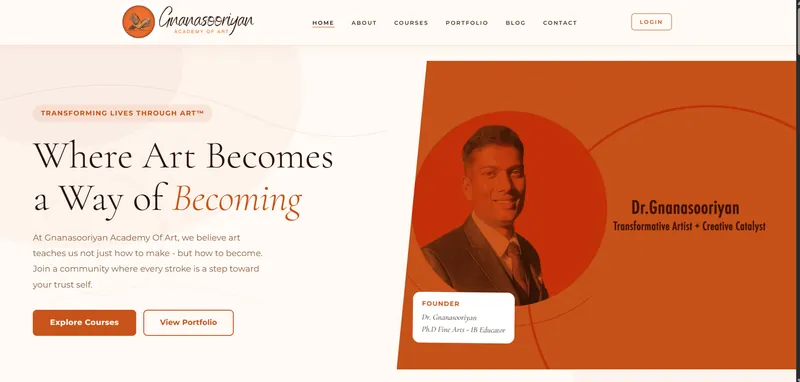
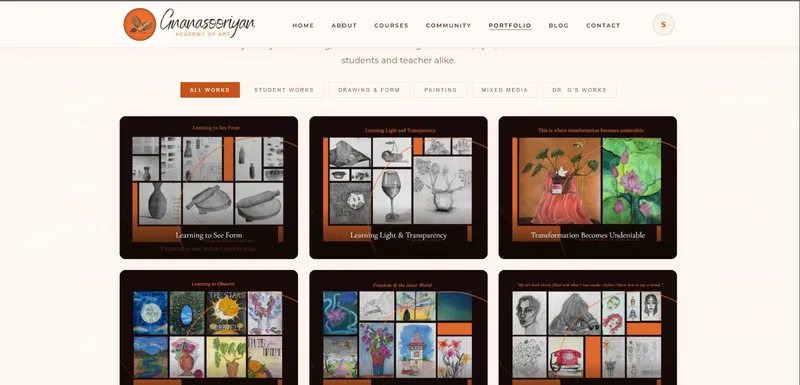
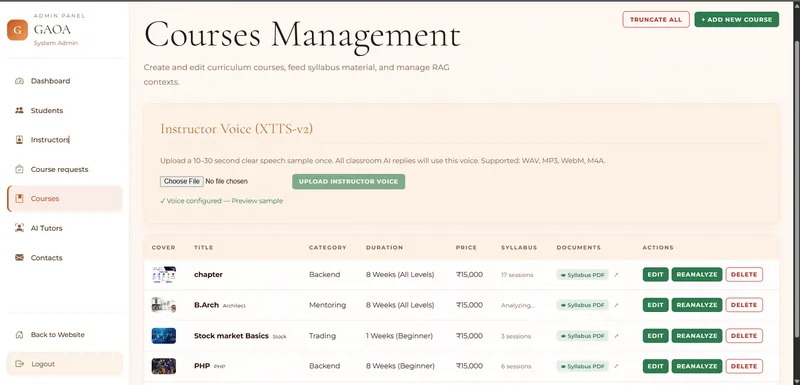
Screens from the platform’s development build, engineered by Vianmax™ for Gnanasooriyan Academy of Arts. They include test content; the classroom, homepage, portfolio and course administration are shown.
Engagement status
Client engagement- Developed and demonstrated. The public site, courses, the AI classroom, portfolio, community and the admin console, shown on this page from the development build.
- In development. Further Phase 1 work, including the instructor voice pipeline for the classroom.
- Planned, extended. Capabilities documented in the target architecture, such as a mobile app, mock tests and analytics.
On this page: Developed · demonstrated is shown in the screens. Documented · not shown is described in the platform overview but not shown. In development is being built. Planned · extended and Target architecture come from the planning documents and are not deployed. Conceptual marks explanatory diagrams.
01 · The challenge
From traditional art education to digital learning.
Gnanasooriyan Academy of Arts teaches art the way it has long been taught: in the studio, through observation, practice and the guidance of a teacher. Taking that education online needed more than a course catalogue on a website.
The academy needed one digital environment where content, teaching, practice and creative work connect, and where the institution can manage the people and courses behind them. The engineering challenge was to join those pieces without reducing teaching to a video player.
- Content
- Learning
- AI assistance
- Interaction
- Creative work
- Community
- Institutional management
- A public institutional presence
- Course delivery
- Student learning
- Instructor interaction
- AI-assisted education
- Assessments
- Portfolios
- Community
- Administrative workflows
Not every capability is live yet. The status of each is marked through this page.
02 · The vision
A digital classroom designed around learning.
Instead of treating technology as a website layer around education, the platform is designed as a learning ecosystem: each stage leads into the next, from the academy to its community.
Conceptual
Figure 1 · The learning ecosystem
- AcademyThe institution, its teachers and its approach
- CoursesStructured programmes students enrol in
- Learning contentTextbooks and syllabus material, organised by topic
- AI-assisted teachingLectures and explanations grounded in that content
- Student interactionQuestions, doubts and guided continuation
- Practice & assessmentTasks, submissions and topic quizzes
- PortfolioCreative work made visible
- CommunityLearning shared beyond the classroom
03 · The idea behind the platform
From content to context to learning.
The thread that runs through the platform: the academy’s own course material becomes the context the AI tutor teaches from, and learning ends in the student’s own creative work.
- 01Course materialTextbooks and syllabus PDFs
- 02ContextChapters, topics, searchable content
- 03AI tutorLectures and answers from that context
- 04TeachingBoard, speech and the textbook page
- 05Student interactionDoubts, quizzes, continuation
- 06UnderstandingLearning that holds
- 07Creative outputWork, portfolio, community
04 · The platform
One platform. Multiple learning experiences.
Eight capability areas in one platform, each shown in the development build. A public site sits in front of a campus for students and instructors, with an admin console behind it.
- 01
Public web experience
Academy information, courses, portfolio, blog and contact.
Developed · demonstrated - 02
Learning management
Course access and enrolment requests, learning content, tasks and submissions.
Developed · demonstrated - 03
AI-assisted learning
Educational assistance grounded in the course’s own material.
Developed · demonstrated - 04
Interactive AI classroom
Tutor-led lectures, a teaching board, the textbook viewer and student doubts.
Developed · demonstrated - 05
Assessments
Topic quizzes generated, submitted and scored.
Developed · demonstrated - 06
Portfolio
Student and creative work, organised by category.
Developed · demonstrated - 07
Community
Posts, images, reactions, follows, profiles and people search.
Developed · demonstrated - 08
Institutional administration
Students, instructors, course requests, courses, AI tutors and contacts.
Developed · demonstrated
05 · AI classroom
An AI tutor inside the classroom.
The classroom is the platform’s central technical feature. Each course opens a live class where an AI tutor teaches from the course’s own textbook: a spoken lecture, a board that writes along, the textbook page it refers to, and a student who can stop the lecture to ask.
Developed · demonstrated
- 1Lesson contextThe course, the topic and what the lesson will cover.
- 2Interactive learningPlay, pause, resume, rewind ten seconds, start and stop.
- 3Course materialOpen content brings up the textbook page the lecture is using.
- 4Teaching boardThe tutor board writes along with the spoken lecture.
- 5TutorA talking tutor avatar, with a preferred tutor language for each student.
- 6Student questionAsk a doubt: the lecture pauses and the answer draws on the course material.
The course in this screen, Stock market Basics, is test content used during development. It is not part of the academy’s curriculum.
Figure 2 · The documented classroom workflow
- Course materialAdmins upload textbook PDFs; a website or a question paper can also be indexed
- Content ingestionThe material is taken in for analysis
- Document analysisThe backend analyses the book
- Chapters and topicsA course structure is built from the book
- Searchable contextContent is stored as searchable chunks in Qdrant
- AI-generated lessonA lecture is generated per topic and cached
- Tutor presentationThe lecture is spoken, with saved playback position
- Board explanationThe board writes along; the textbook page is highlighted
- Student interactionThe student follows, pauses and resumes
- Questions and doubtsThe student interrupts to ask
- Context-grounded responseThe answer is tied to the course material
- Quiz or continuationA topic quiz, or back to the lecture
What the classroom does
- Lecture generation and cachingA lecture per topic, cached (with Redis where configured) and prefetched ahead of the class.Developed · demonstrated
- Board-based teachingThe tutor board writes along with the speech.Developed · demonstrated
- Textbook viewerThe page the lecture refers to is shown and highlighted.Developed · demonstrated
- Student doubtsThe lecture pauses; the answer is grounded in the course material; playback resumes.Developed · demonstrated
- Topic quizzesGenerated, submitted and scored.Developed · demonstrated
- Tutor languageEach student sets a preferred tutor language.Developed · demonstrated
- Talking tutorPhoto packs become a lip-synced avatar.Developed · demonstrated
- Voice pipelineSpeech recognition and voice synthesis exist in the backend; the classroom currently uses browser speech.In development
06 · The learning loop
A learning loop, not just a video player.
The classroom is designed around interaction rather than passive viewing. A student can stop the lecture at any point, ask, practise and return, and each topic ends with something the student does.
Developed · demonstrated
- 01Select courseFrom the catalogue
- 02Open lessonA topic from the syllabus
- 03Understand contextWhat the lesson covers
- 04AI explainsA spoken lecture
- 05Follow the boardWriting and textbook
- 06Ask a questionPause and ask
- 07Contextual guidanceFrom course material
- 08PractiseTasks and submissions
- 09Complete quizGenerated and scored
- 10Continue learningThe next topic
07 · Course context
Grounding AI in course context.
Developed · demonstrated
The tutor is designed around the course’s own material rather than acting as a generic chatbot. Administrators upload the textbook; the backend analyses it, builds chapters and topics, and stores searchable chunks in Qdrant, so lectures, answers and quizzes stay tied to what the course teaches.
The admin console describes the same idea in its own words: create and edit curriculum courses, feed syllabus material, and manage RAG contexts. A course can be re-analysed when its material changes.
- Textbook PDFs
- Website indexing
- Question papers
- Chapters and topics
- Qdrant retrieval
- Re-analysis
Figure 3 · From course documents to a learning response
Source
Analysis
Structure
Knowledge
Retrieval
Teaching
Outcome
08 · Interactive teaching
Teaching has a visual layer.
Developed · demonstrated
In a studio, a teacher talks and draws at the same time. The classroom carries that into the digital space: the tutor board writes as the lecture is spoken, the textbook page it refers to can be opened and is highlighted, and the student controls the pace with play, pause, resume and rewind.
When the topic is done, a quiz checks what was learned against the same text. A session can be completed or restarted, and playback position is saved.
- Lesson explanation
- Tutor board
- Written teaching content
- Playback controls
- Textbook viewer
- Page highlighting
- Student questions
- Continuation of learning
09 · Course experience
Structured learning, delivered digitally.
Developed · demonstrated
Courses are discovered by category, and each card carries its level, duration, price and a Take Class action that leads into the classroom. Students request enrolment, and administrators approve it.
- Course discovery with category filters
- Course information: level, duration and price
- Enrolment requests, approved by administrators
- Take Class, straight into the AI classroom
The courses in this screen are demonstration content used to test the platform, not the academy’s final catalogue.
10 · Portfolio
Learning becomes visible.
Developed · demonstrated
For an art academy, the work is the evidence of learning. The portfolio presents student and instructor work in curated collections, organised by discipline, so progression from observation to expression can be seen.
- Student Works
- Drawing & Form
- Painting
- Mixed Media
- Dr. G’s Works
- Showcase student work
- Present creative development
- Organise work by category
- Show progression
- Connect learning with visible output
11 · Community
Learning beyond the classroom.
Developed · demonstrated
Signed-in students and staff share a community feed around learning and creative work. It gives the academy a place for conversation between classes, and for students to share what they are making.
- Posts
- Images
- Likes
- Comments
- Reposts
- Saves
- Sharing
- Following
- Profiles
- People search
Names, profile photos and a third-party image are blurred in this screenshot.
12 · Administration
The institution behind the learning.
Developed · demonstrated
The admin console runs the academy’s side of the platform. Courses are created, edited and re-analysed; syllabus PDFs are attached; and each course’s analysed sessions are listed beside it.
The console also holds AI tutor profiles, with photos, a default tutor and avatar generation, and an instructor voice setting: a short speech sample uploaded once for the classroom’s spoken replies. That voice pipeline is still being integrated into the classroom.
- Students and enrolment approval
- Instructors, course assignment and student mapping
- Course requests
- Courses, categories, syllabus material and RAG contexts
- AI tutor profiles
- The contact inbox, with read status and e-mail replies
13 · Roles
Three roles, one campus.
Signed-in users share one campus dashboard, shaped by their role. Admins approve students and enrolments, create instructors, assign courses and map each student to an instructor.
Developed · demonstrated
Student
Signs up; the account stays pending until an admin approves it.
- Learn
- Attend
- Ask
- Practise
- Submit
- Build portfolio
Instructor
Created by an admin and assigned courses and students.
- Teach
- Create tasks
- Review work
- Guide students
- Manage learning
Admin
Runs the academy’s side of the platform.
- Approve
- Manage
- Configure
- Monitor
- Operate
14 · Creative technology
Where education meets creative technology.
The project extends beyond a conventional learning management system. It sits where education, AI, content and creative practice meet, which is what makes it a creative-technology engagement as well as an EdTech one.
- Education
- AI
- Content
- Creative work
- Interactive media
- Community
- Digital platforms
Creative technology workflows explored within the platform include a 3D workflow.
Documented · not shown
Figure 4 · Photo to 3D model, shared with the instructor
- 01Submit workThe student submits a task
- 02Photo to 3DA photo becomes a 3D model
- 03ShareThe model is shared with the instructor
- 04ReviewThe instructor reviews and views it
Described in the platform overview; not shown in the screens on this page. The platform is not a 3D production tool.
15 · Architecture
Engineering the learning platform.
Two layers of architecture, kept apart on purpose. The first is the Phase 1 architecture documented in the development blueprint. The second is the broader target architecture from the system architecture document, which describes where the platform could go; it is not deployed.
Documented · Phase 1 blueprint
Figure 5 · Phase 1 architecture (documented)
Presentation
Application
Domain
Data
Access
Integrations
Operations
Target architecture
Figure 6 · Broader platform architecture (target)
Clients
Edge
Services
Services
Data
Platform
Diagrams are logical. The target architecture is a documented direction, not a description of what is running.
16 · AI architecture
How a question becomes a grounded answer.
A conceptual view of the AI tutor. It shows how the parts relate, not how they are implemented; model choices and other implementation details are not described.
Conceptual
Figure 7 · Conceptual AI tutor architecture
Learner
Interface
Orchestration
Context
Retrieval
Tutor
Response
17 · Technology
Documented technology.
The Phase 1 stack as documented in the development blueprint, and the AI and learning infrastructure described in the platform overview. Target-architecture technologies are not listed here. Which blueprint technologies are in the current build is being confirmed.
Documented · Phase 1 blueprint Documented · not shown
| Layer | Technology | Source |
|---|---|---|
| Frontend | React.js | Phase 1 blueprint |
| Backend | Node.js, Express | Phase 1 blueprint |
| Database | MySQL, Sequelize | Phase 1 blueprint |
| Authentication | JWT | Phase 1 blueprint |
| Payments | Razorpay | Phase 1 blueprint |
| Nodemailer | Phase 1 blueprint | |
| Infrastructure | AWS EC2 or VPS, Nginx, PM2 | Phase 1 blueprint |
| Development | Git, GitHub | Phase 1 blueprint |
| Course-context retrieval | Qdrant | Platform overview |
| Lecture caching | Redis, where configured | Platform overview |
| Media storage | MinIO, for community media | Platform overview |
| Tutor voice | XTTS-v2 instructor voice (being integrated) | Admin console |
18 · Project status
Built in phases.
Phase 1 substantially developed, with further development in progress. The planned items come from the project’s planning documents and are listed as planned only.
Developed · demonstrated
Developed · demonstrated- Public academy website
- Course experience
- AI classroom experience
- Topic quizzes
- Portfolio
- Community
- Administrative course management
- AI tutor workflows: textbook pipeline, lectures, doubts, avatar
In development
In development- Further Phase 1 development
- Instructor voice pipeline in the classroom (currently browser speech)
Planned · extended
Planned · extended- Mobile app
- Mock tests and test series
- Live classes
- Certificates
- Analytics
- The target service architecture
19 · Our contribution
What Vianmax™ engineered.
- Digital platform architecture
- Public web experience
- Learning platform foundation
- Course workflows
- AI-assisted classroom experience
- Course-content context pipeline
- Student, instructor and admin workflows
- Portfolio experience
- Community experience
- Administrative tooling
- Platform integration
- Backend and deployment engineering
20 · Engineering outcomes
What the engagement has established so far.
- 01Digital course deliveryCreated a foundation for delivering the academy’s courses digitally.
- 02AI-assisted classroomIntroduced interaction with an AI tutor into the classroom.
- 03Content and contextConnected learning content with contextual AI assistance.
- 04Portfolio and communityExtended the learning environment into portfolios and community.
- 05Institutional workflowsEstablished workflows for managing students, instructors and courses.
Outcomes are described qualitatively. No usage, enrolment, performance or business figures are published.
21 · Project gallery
The platform, screen by screen.
Seven screens from the development build. Open any screen to see it full size. The screens include test content.
Developed · demonstrated
Academy homepageThe public academy website: the academy's message, courses and portfolio, with sign-in.
AI interactive classroomTutor guidance, a teaching board, course context and student questions in one classroom.
Course discoveryCourse cards with category filters, duration, price and Take Class. The cards show test content.
PortfolioStudent and instructor work organised by category.
CommunityPosts, reactions, reposts, saves, people search and trending posts. Names, photos and one image are blurred.
Course administrationCurriculum courses, syllabus material and RAG contexts, with an instructor voice setting.
Topic quizA practice test generated from the topic, over the textbook page viewer.
A note on our products
A client platform, not a Vianmax™ product.
AI-assisted learning also appears in our own products. The two are separate.
Gnanasooriyan Academy of Arts
A client-specific EdTech platform engineered by Vianmax™ for the academy, with its own AI classroom. The academy’s brand and content are its own.
AlphaSync Campus
Vianmax™’s own financial learning and simulation platform for institutions. It shares no product, brand or data with this engagement.
About AlphaSync CampusAbout this case study. Gnanasooriyan Academy of Arts is a Vianmax™ client. The platform described here is engineered by Vianmax™ for the academy and is not a Vianmax™ product. Phase 1 substantially developed, with further development in progress. Screens come from the development build and include test content; personal details in the community screen are blurred. The target architecture is a documented direction, not a deployed system. The AI tutor is an educational aid; its answers can be incomplete or wrong.
Building the next generation of learning platforms.
Vianmax™ engineers intelligent digital platforms that connect software, AI, data and human workflows to create new learning and operating experiences.